When people need a nearby restaurant, plumber, dentist, store, or other local service, Google is often the first place they look. They want quick answers: where the business is located, when it is open, what customers think, and how to contact it.
That is where a Google Business Profile comes in.
If you have ever searched for a local company and seen its hours, phone number, reviews, photos, directions, and website directly in Google, you have already interacted with one.
But what is a Google Business Profile, and why should your business care about having one? This guide explains how it works, why it matters for local SEO, and how it can help turn Google searches into real customers.
What Is a Google Business Profile?
A Google Business Profile is a free business listing that allows companies to manage how their information appears across Google Search and Google Maps.
It was previously known as Google My Business, or GMB. Google renamed the service Google Business Profile, but its main purpose remains the same: helping businesses connect with people searching for their products or services.
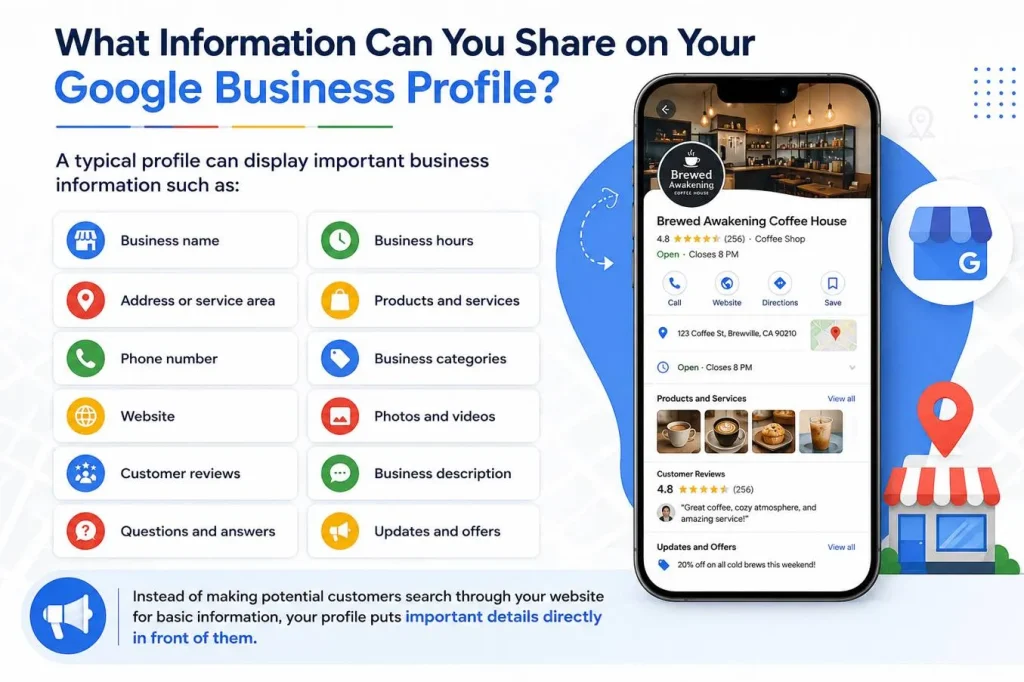
A typical profile can display important business information such as:
- Business name
- Address or service area
- Phone number
- Website
- Business hours
- Products and services
- Business categories
- Photos and videos
- Customer reviews
- Business description
- Questions and answers
- Updates and offers
Instead of making potential customers search through your website for basic information, your profile puts important details directly in front of them.
How Does a Google Business Profile Work?
Once a business creates or claims its profile, it can provide Google with accurate information about its location, services, contact details, and operating hours.
Google may then display that information when someone performs a relevant search.
For example, someone might search:
- “Coffee shop near me”
- “Emergency plumber”
- “Best dentist near me”
- “Car repair in Chicago”
- “Italian restaurant open now”
Relevant businesses may appear in local search results or on Google Maps.
Your Google Business Profile acts like a digital storefront. Before someone visits your website or physical location, they can quickly evaluate your business through your listing.
Why Should You Care About Your Google Business Profile?
Having a website is important, but your website is not always the first thing customers see.
For many local searches, Google displays map-based results and business profiles prominently. A complete and well-maintained profile can therefore become an important part of your online presence.
Improve Your Local Search Visibility
One of the biggest benefits of a Google Business Profile is increased visibility in local searches.
When someone searches for a product or service in a specific area, Google tries to provide relevant nearby businesses. An accurate and optimized profile gives Google more information about what your business does and where it operates.
This can improve your chances of appearing when local customers are actively looking for your services. For a broader look at how organic and paid visibility work together, you can also explore how SEO and SEM work together.
Help Customers Find You on Google Maps
Google Maps is not only used for directions. People also use it to discover businesses and compare their options.
A Google Business Profile can provide customers with your location, directions, hours, reviews, photos, and other useful information without requiring them to leave Maps.
For businesses that depend on local foot traffic or service-area customers, this visibility can be especially valuable.
Build Trust Through Customer Reviews
Online reviews often influence which company a customer chooses.
Your Google Business Profile gives customers a place to leave ratings and feedback about their experiences. Potential customers can use these reviews to evaluate your reputation before contacting you.
Businesses can also respond to reviews. Professional responses show that you value customer feedback and actively manage your online reputation.
What Information Should Your Google Business Profile Include?
Completeness matters when managing a local business listing. Missing or outdated details can create confusion and potentially send customers somewhere else.
Here are some of the most important elements to maintain:
| Profile Element | Why It Matters |
|---|---|
| Business Name | Helps customers identify your company |
| Primary Category | Tells Google what type of business you operate |
| Address | Helps customers find physical locations |
| Service Area | Shows where service-based businesses operate |
| Phone Number | Makes contacting your business easier |
| Website | Sends customers to your main online presence |
| Business Hours | Shows customers when you are available |
| Photos | Gives customers a better view of your business |
| Reviews | Provides social proof and customer feedback |
| Services | Explains what your company offers |
Accuracy is essential. If your opening hours change, for example, your profile should be updated as soon as possible.
How Google Business Profile Supports Local SEO
Google Business Profile and local SEO work closely together.
Local SEO focuses on improving a company’s visibility for searches connected to a geographic area. Your business profile provides Google with important signals about your business, including its category, location, services, and relevance to local searches.
Relevance
Google needs to understand how closely your business matches what someone is searching for.
Choosing accurate categories and providing detailed business information can help Google better understand your services.
Distance
Location also matters in local search.
Google may consider how close a business is to the location used or implied by the person performing the search. You cannot optimize your way around physical distance, but accurate location and service-area information is still important.
Prominence
Google also considers how well-known or established a business appears to be.
Information available across the web, links, reviews, and other signals can contribute to prominence. Maintaining a strong online presence beyond your profile can therefore support your broader local SEO strategy.
Google Business Profile vs. a Business Website
A Google Business Profile does not replace your website. The two serve different purposes and work better together.
Your profile helps customers quickly discover important information, while your website gives you more control over your brand, content, services, and conversion journey.
Think of it this way:
Google Business Profile = discovery and quick information
Website = deeper information and conversion
A potential customer might discover your business through Google Maps, read your reviews, check your opening hours, and then visit your website to learn more or make a purchase.
Your website can also support the information people discover through search, especially when you maintain useful content. Publishing helpful resources is one reason having a business blog can be valuable.
What Businesses Can Benefit From a Google Business Profile?
Google Business Profiles are particularly useful for businesses that interact with customers in person or serve customers within specific geographic areas.
Examples include:
- Restaurants and coffee shops
- Retail stores
- Dental and medical practices
- Law firms
- Plumbers and electricians
- HVAC companies
- Auto repair shops
- Salons and spas
- Real estate agencies
- Cleaning companies
- Contractors
- Hotels and hospitality businesses
Service-area businesses may also be able to create profiles even when customers do not visit a traditional storefront.
Common Google Business Profile Mistakes to Avoid
Creating a profile is only the beginning. Poorly maintained information can limit its usefulness to both customers and search engines.
Using Inconsistent Business Information
Your business name, address, phone number, and other important details should be accurate and consistent.
Incorrect information can frustrate customers and make it harder for search engines to understand your business.
Choosing the Wrong Business Category
Your primary category helps explain what your business actually does.
Choose the category that most accurately represents your core business rather than selecting categories simply because they contain attractive keywords.
Ignoring Customer Reviews
Reviews should not be treated as a one-way conversation.
Respond to both positive and negative feedback professionally. A thoughtful response can demonstrate that your company listens to customers and takes their experiences seriously.
Forgetting to Update Business Hours
Few things frustrate customers more than traveling to a business that Google says is open only to find it closed.
Keep regular hours, holiday hours, and temporary changes updated.
Leaving the Profile Incomplete
An incomplete listing gives customers less information when they are deciding whether to contact your business.
Add relevant services, photos, categories, contact information, and other available details that accurately describe your company.

How to Optimize Your Google Business Profile
Optimization does not mean stuffing keywords into every available field. The goal is to make your profile accurate, useful, and informative.
Start with these steps:
- Complete your business information. Fill out all relevant fields with accurate details.
- Choose the most accurate categories. Select a primary category that closely matches your main service.
- Add high-quality photos. Use real images of your location, team, products, or completed work when appropriate.
- Keep your hours updated. Review regular and special hours frequently.
- Encourage genuine customer reviews. Make it easy for satisfied customers to share their experiences.
- Respond to reviews. Engage professionally with customer feedback.
- Review your profile regularly. Check for outdated information and make necessary changes.
Google Business Profile optimization should be an ongoing part of your local marketing strategy rather than a one-time setup task.
Is Google Business Profile Free?
Yes. Creating and managing a Google Business Profile is free.
That makes it an accessible local marketing tool for businesses of different sizes. You can provide important information, publish photos, manage reviews, and help customers discover your business without paying for the profile itself.
Paid Google advertising is separate from managing a standard Business Profile.
Why Google Business Profile Matters for Your Business
Understanding what is a Google Business Profile is important because local customers often make decisions directly from Google Search and Maps.
A complete profile can help people discover your business, understand what you offer, read customer feedback, find your location, and contact you quickly.
It also supports a broader local SEO strategy by providing Google with accurate information about your business and its services.
For businesses looking beyond traditional search results, it is also worth understanding how to optimize your website for AI search, since search behavior continues to evolve.
Conclusion
A Google Business Profile is much more than a basic online business listing. It can become one of the most visible touchpoints between your company and potential local customers.
Keep your information accurate, choose relevant categories, add useful photos, manage customer reviews, and regularly update your profile. Combined with a strong website and local SEO strategy, these efforts can help improve your presence when customers search for businesses like yours.
FAQs
What is a Google Business Profile?
A Google Business Profile is a free listing that lets businesses manage how they appear on Google Search and Google Maps. It can display your business hours, location, phone number, website, photos, services, and customer reviews.
Is a Google Business Profile free?
Yes, creating and managing a Google Business Profile is free. Businesses can update their information, add photos, respond to reviews, and manage their local presence without paying for the profile.
Does a Google Business Profile help with SEO?
Yes, an optimized Google Business Profile can support local SEO by helping Google understand your business, location, and services. Accurate information, relevant categories, reviews, and an active profile can strengthen your local search presence.
How do I optimize my Google Business Profile?
Complete all relevant business information, choose accurate categories, add high-quality photos, keep your hours updated, list your services, collect genuine customer reviews, and respond to customer feedback regularly.
Do I need a Google Business Profile if I already have a website?
Yes, especially if your business serves local customers. Your website provides detailed information about your business, while your Google Business Profile helps people discover and evaluate your company directly through Google Search and Maps.