Learning how to optimize a Google Business Profile helps you build a stronger presence across Google Search and Maps. More importantly, good optimization makes it easier for potential customers to understand what you offer, where you operate, and how they can contact you.
Google explains that local results are primarily influenced by relevance, distance, and prominence. You cannot control every part of that equation, especially the searcher’s location, but you can improve the signals that help Google understand and trust your business.
Here is how to do it.
1. Complete and Verify Your Google Business Profile
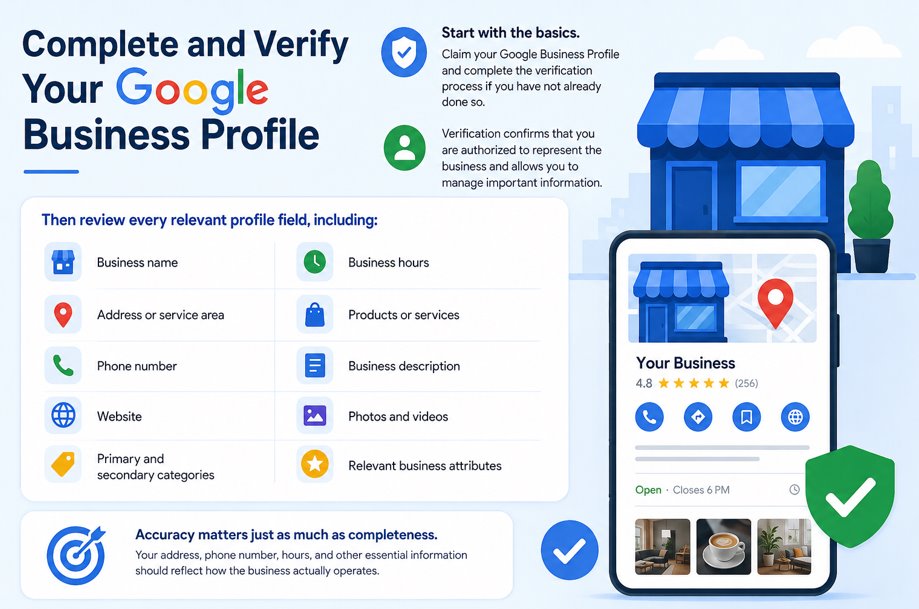
Start with the basics.
Claim your Google Business Profile and complete the verification process if you have not already done so. Verification confirms that you are authorized to represent the business and allows you to manage important information.
Then review every relevant profile field, including:
- Business name
- Address or service area
- Phone number
- Website
- Primary and secondary categories
- Business hours
- Products or services
- Business description
- Photos and videos
- Relevant business attributes
Accuracy matters just as much as completeness. Your address, phone number, hours, and other essential information should reflect how the business actually operates.
2. Choose the Most Accurate Business Categories
Categories are one of the strongest ways to explain what your business actually does.
Choose a primary category that describes your core business as specifically as possible. You can then add relevant secondary categories when they accurately represent additional services.
For example, a business that primarily provides plumbing services should select the closest available plumbing category instead of using broader or loosely related categories simply because they contain desirable keywords.
Google recommends using as few categories as necessary and selecting categories that represent the business rather than treating them as keywords.
Practical tip: Review your categories periodically. Google can introduce or change available categories, and your business services may evolve over time.
3. Write a Useful Business Description
Your description gives potential customers a quick understanding of your business.
Explain:
- What the business does
- Who it serves
- Important products or services
- What makes the business different
- The areas you serve, where naturally relevant
Write for customers first rather than trying to force every local SEO keyword into the description.
For example, instead of writing:
“Best London SEO agency SEO services London local SEO London business.”
Use natural language such as:
“We help businesses improve their organic and local search visibility through SEO strategy, content optimization, technical SEO, and data-driven search marketing.”
Google’s guidelines specifically recommend providing useful information about your services, products, mission, and history while avoiding irrelevant or promotional content.
4. Add Your Products and Services
Do not make customers guess what you sell.
Where the relevant profile features are available, add your main services or products and describe them clearly. Use the terminology customers normally use when searching, provided it accurately describes the offering.
A marketing consultant, for example, might list services such as:
- Search engine optimization
- PPC management
- Local SEO
- Google Business Profile optimization
- Digital marketing strategy
This creates a clearer picture of the business for both users and search engines.

Want Better Local Search Visibility?
Optimizing individual fields is only part of local SEO. Your Google Business Profile, website, content, reviews, and search strategy should work together.
Need help turning local searches into qualified leads? Work with Salman Yousuf to build a data-driven digital marketing strategy designed around measurable business growth.
5. Keep Your Name, Address, and Phone Details Consistent
Your core business information should be accurate wherever customers and search engines encounter your company online.
Check important sources such as your:
- Website
- Contact page
- Social profiles
- Major business directories
- Industry directories
Small formatting differences are not necessarily a problem. The bigger concern is conflicting information—for example, an old phone number on one important directory and a new number on your website.
Consistency reduces confusion and strengthens the connection between your Business Profile and the wider web presence of your business.
6. Build a Strong Google Review Strategy
Reviews can influence both customer decisions and local visibility.
Google states that review count and positive ratings can contribute to local ranking. That does not mean you should chase reviews purely for SEO. The better strategy is to build a steady process for requesting genuine feedback from real customers.
Ask satisfied customers for reviews after meaningful interactions, such as:
- Completing a service
- Delivering an order
- Finishing a project
- Resolving a customer problem
Respond to reviews as well.
Keep responses specific and professional rather than posting the same generic reply every time. For negative feedback, acknowledge the issue and move detailed problem-solving into a private conversation when appropriate.
Never buy reviews or manufacture customer feedback.
7. Upload High-Quality Photos and Videos
A Business Profile is also a visual representation of your company.
Upload genuine images that help people understand what they can expect. Depending on the business, these might include:
- Exterior and storefront photos
- Interior images
- Team photos
- Products
- Completed work
- Service environments
- Short videos
Google recommends clear, well-lit photos without excessive alterations.
Photos may not replace fundamentals such as accurate categories and business information, but they make a profile more useful and can help customers feel more confident about choosing the business.
8. Keep Hours and Business Information Updated
Outdated information creates a poor customer experience.
If someone drives to your location because Google says you are open—only to find the business closed—you may lose more than a single visit.
Review your regular hours and update special hours for holidays or unusual operating schedules.
Also revisit the entire profile whenever you change:
- Phone numbers
- Website URLs
- Locations
- Service areas
- Services
- Business categories
Treat your profile as an active marketing asset rather than a listing you configure once and forget.

9. Connect Your Google Business Profile With Your Website
One commonly overlooked part of GBP optimization happens outside the Business Profile itself.
Google can use publicly available web content as one source of business information. Your website should therefore reinforce the same business entity and services presented on your profile.
Make sure important landing pages clearly communicate:
- What you offer
- Where you operate
- How customers can contact you
- Why your business is relevant to the searcher’s needs
For businesses serving multiple legitimate locations, create genuinely useful location-specific pages rather than producing dozens of near-identical pages with city names swapped out.
You can also implement appropriate LocalBusiness structured data on the website. Structured data gives search engines machine-readable information about the business and its properties.
The goal is bigger than optimizing one listing. Your website, Google Business Profile, citations, and wider online presence should tell a consistent story about the same business.
10. Measure Performance and Improve Over Time
Google Business Profile optimization should be an ongoing process.
Use Business Profile performance data to understand how people interact with your listing. Depending on the features available to your profile, you can monitor metrics such as:
| Metric | What It Can Tell You |
|---|---|
| Website clicks | How often users move from your profile to your site |
| Calls | How often users click the call button |
| Directions | Interest in visiting your physical location |
| Search terms | Queries people use to discover the business |
| Bookings | Customer booking activity when supported |
Look beyond raw profile views.
If people are finding your profile but rarely calling, visiting the website, requesting directions, or taking another useful action, investigate why. Your photos, reviews, offer, landing page, or business information may need improvement.
Local SEO works best as a continuous cycle:
Optimize → Measure → Learn → Improve
Common Google Business Profile SEO Mistakes to Avoid
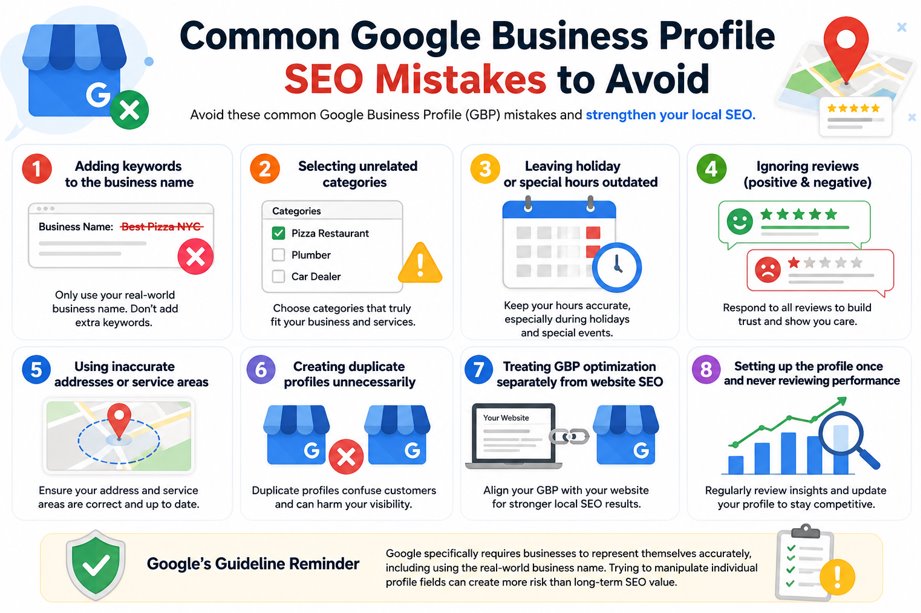
Even well-established businesses make basic optimization mistakes.
Watch for:
- Adding keywords to the business name when they are not part of the real-world name.
- Selecting unrelated categories just to target more searches.
- Leaving holiday or special hours outdated.
- Ignoring negative and positive reviews.
- Using inaccurate addresses or service areas.
- Creating duplicate profiles unnecessarily.
- Treating GBP optimization separately from website SEO.
- Setting up the profile once and never reviewing its performance.
Google specifically requires businesses to represent themselves accurately, including using the real-world business name. Trying to manipulate individual profile fields can create more risk than long-term SEO value.
FAQs
How do I optimize a Google Business Profile for SEO?
Complete and verify your profile, choose accurate categories, add your services, maintain correct business information, earn genuine customer reviews, upload quality photos, keep your hours updated, and ensure your website supports the same business information.
Does Google Business Profile help SEO?
Yes. A properly managed Google Business Profile can improve a business’s presence in relevant local results on Google Search and Maps. Local rankings are primarily influenced by relevance, distance, and prominence.
How often should I update my Google Business Profile?
Update it whenever important business information changes. It is also good practice to review the profile regularly for outdated hours, services, categories, photos, customer reviews, and other information.
Do Google reviews improve local rankings?
Reviews are one factor in local visibility. Google states that more reviews and positive ratings can help local ranking, while reviews also provide valuable trust signals to potential customers.
Should I add keywords to my Google Business Profile name?
Only if those words are genuinely part of your real-world business name. Adding unnecessary keywords to manipulate rankings violates Google’s guidelines and can put the profile at risk.
Conclusion
The best way to optimize a Google Business Profile is not to search for shortcuts. Build a complete, accurate, useful profile that clearly explains what your business does and gives customers the information they need to take action.
Focus on accurate categories, complete services, genuine reviews, useful photos, correct hours, consistent business information, and a website that reinforces your local presence. Then monitor performance and continue improving what matters.
Your Google Business Profile should not operate in isolation. It should be part of a wider SEO and digital marketing strategy built around visibility, trust, and conversions.
Ready to strengthen your search presence and turn more visibility into business growth? Connect with Salman Yousuf for a data-driven digital marketing strategy built around your goals.