Setting up a Google Business Profile looks simple, but not every business qualifies. Google has specific eligibility, location, ownership, and information requirements that businesses must follow.
If you’re researching the requirements for Google My Business, there is one terminology change worth knowing first: Google My Business is now called Google Business Profile.
The basic requirement is straightforward: your business generally needs to make in-person contact with customers during its stated hours. That can happen at a physical business location or, for eligible service-area businesses, at the customer’s location.
However, eligibility is only the beginning.
Here’s what you need to know before creating or verifying your profile.
What Are the Basic Requirements for Google My Business?
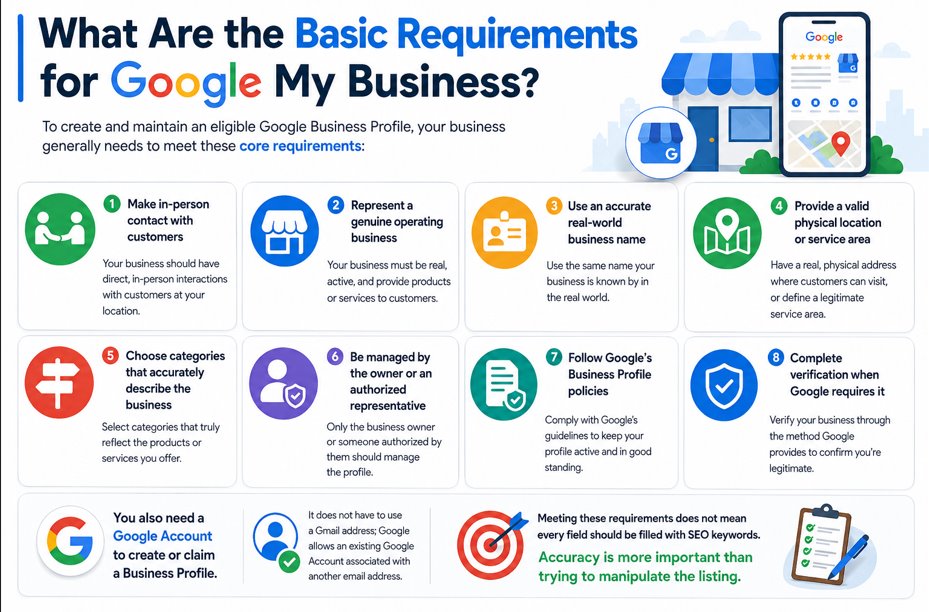
To create and maintain an eligible Google Business Profile, your business generally needs to meet these core requirements:
- Make in-person contact with customers
- Represent a genuine operating business
- Use an accurate real-world business name
- Provide a valid physical location or legitimate service area
- Choose categories that accurately describe the business
- Be managed by the owner or an authorized representative
- Follow Google’s Business Profile policies
- Complete verification when Google requires it
You also need a Google Account to create or claim a Business Profile. It does not have to use a Gmail address; Google allows an existing Google Account associated with another email address.
Meeting these requirements does not mean every field should be filled with SEO keywords. Accuracy is more important than trying to manipulate the listing.
1. Your Business Must Be Eligible
Eligibility is the first requirement to check.
Google states that businesses generally qualify when they make in-person contact with customers during their stated business hours.
That typically covers two major business models.
Storefront Businesses
A storefront business serves customers at a physical location.
Examples include:
- Restaurants
- Retail stores
- Dental practices
- Salons
- Auto repair shops
- Local offices that receive customers
If you display your address publicly, Google requires the location to be a genuine business location. Businesses displaying their address should also maintain permanent fixed signage showing the business name.
Service-Area Businesses
A service-area business travels to customers instead of serving them at its address.
Common examples include:
- Plumbers
- Electricians
- Cleaning companies
- Mobile repair services
- Landscaping companies
These businesses can create a profile even without a traditional customer-facing storefront.
However, if customers do not visit your business address, you should hide the address from your public profile and specify your service area instead.
2. Online-Only Businesses Usually Don’t Qualify
One of the biggest misunderstandings about Google Business Profile is that every company with a website can create one.
That isn’t the case.
Google specifically identifies online-only businesses as ineligible when they do not have a physical location customers can visit and do not meet customers in person.
Other examples of businesses or entities that generally aren’t eligible include:
- Lead generation companies
- Online-only brands
- Properties solely for rent or sale
- Ongoing classes or services at locations the business doesn’t own or have authority to represent
There are exceptions and special rules for certain business types, so unusual business models should be checked against Google’s current eligibility guidelines before creating a listing.

3. Use Your Real Business Name
Your Business Profile name should match the name customers encounter in the real world.
That means it should be consistent with legitimate branding such as yours:
- Storefront signage
- Website
- Business stationery
- Other established branding
Do not add keywords simply because you want to rank for them.
For example, if your actual company is called:
Wilson Plumbing
You shouldn’t change the profile name to:
Wilson Plumbing – Best Emergency Plumber in Chicago
unless that entire phrase genuinely represents the business’s real-world name.
Google specifically prohibits unnecessary information in business names, and violations can lead to profile problems or suspension.
4. Provide an Accurate Address or Service Area
Your location information needs to represent where your business actually operates.
For storefront businesses, provide a precise physical address where customers can legitimately visit the business.
Google does not accept P.O. boxes or remote mailboxes as business locations.
Virtual offices also generally do not qualify as locations for Business Profiles when the business does not actually operate there.
Coworking spaces have additional requirements. An office in a coworking location may qualify only when it meets Google’s conditions, including appropriate signage, customer access during business hours, and staffing by your own business team.
For service-area businesses, use the location from which the business operates and configure your service area appropriately rather than displaying an address customers cannot visit.
5. Select Accurate Business Categories
Categories tell Google what your business actually is.
Choose the most specific primary category available that accurately describes your main business activity.
You can add additional categories when they represent genuine secondary parts of the business.
For example, a company whose primary business is plumbing should choose the most relevant plumbing category rather than adding unrelated categories just to appear for more searches.
Google recommends using as few categories as necessary to describe the core business.
Think:
“What is my business?”
Not:
“What keywords do I want to rank for?”
That distinction can prevent both poor optimization and policy problems.
Need Help Setting Up Your Google Business Profile Correctly?
Meeting Google’s requirements is only the first step. A properly optimized profile can also help your business build stronger visibility across local Search and Maps.
Work with Salman Yousuf to optimize your Google Business Profile for accurate setup, stronger local visibility, better customer engagement, and more qualified leads.

6. Use a Valid Business Phone Number and Website
Google recommends providing a phone number that connects directly to the individual business location or a website that represents that location.
When possible, use a local phone number rather than a central call center number.
Your website should also represent the actual business. Avoid URLs designed simply to redirect visitors to unrelated landing pages.
Most importantly, the phone number and website should be under the business’s control.
This helps create a consistent relationship between your Business Profile, website, and real-world business identity.
7. Add Accurate Business Hours
If your business has regular customer-facing hours, list them accurately.
These should represent the times when customers can normally interact with your business.
Google also supports special hours for circumstances such as:
- Public holidays
- Special events
- Temporary schedule changes
- Seasonal operations
Some business types with variable schedules or appointment-based operations may need to handle hours differently.
Keeping this information accurate is not merely an SEO task. Wrong opening hours can send customers to a closed location and damage trust before they ever contact you.
8. You Must Be Authorized to Manage the Profile
Not everyone can claim and manage a business simply because they know its information.
Google states that Business Profiles should be verified and managed by the business owner or an authorized representative.
If an SEO consultant or marketing agency manages your profile, the business owner should maintain appropriate ownership and grant the agency management access.
This is a small operational detail that can prevent major problems later.
If you change agencies or employees, maintaining proper ownership makes it easier to control access without losing the profile itself.
9. Be Prepared to Verify Your Business
Google may require verification before you can fully manage your Business Profile.
The verification options available can vary depending on the business and circumstances, so you should follow the methods Google presents for your profile rather than assuming everyone receives the same option.
Video verification is one method Google currently uses.
When video verification is requested, Google may require evidence showing:
- The business location
- Business signage or branding
- Evidence that the business exists
- Proof that you manage or represent the business
For example, Google says a verification video may need to show things only an employee or authorized person can access, such as a cash register, storage area, kitchen, or point-of-sale system.
The goal is straightforward: Google wants evidence that the business exists and that you are authorized to represent it.
10. Follow Google’s Policies After Verification
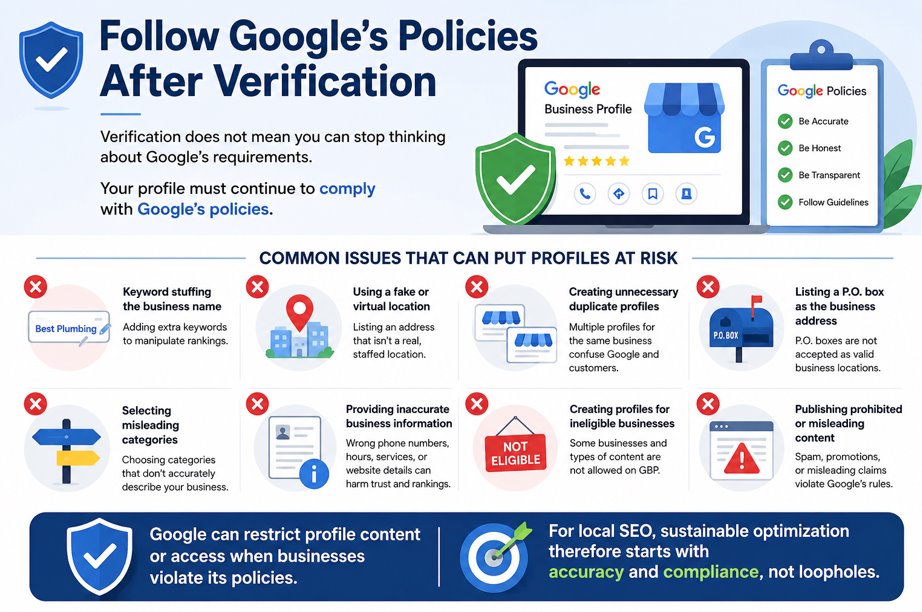
Verification does not mean you can stop thinking about Google’s requirements.
Your profile must continue to comply with Google’s policies.
Common issues that can put profiles at risk include:
- Keyword stuffing the business name
- Using a fake or virtual location
- Creating unnecessary duplicate profiles
- Listing a P.O. box as the business address
- Selecting misleading categories
- Providing inaccurate business information
- Creating profiles for ineligible businesses
- Publishing prohibited or misleading content
Google can restrict profile content or access when businesses violate its policies.
For local SEO, sustainable optimization therefore starts with accuracy and compliance, not loopholes.
Google Business Profile Requirements Checklist
Use this quick checklist before creating your profile:
| Requirement | What to Check |
|---|---|
| Business eligibility | You have legitimate in-person customer contact |
| Google Account | You have an account to create or claim the profile |
| Business name | Matches your real-world branding |
| Address | Represents a legitimate operating location |
| Service area | Accurately reflects where you serve customers |
| Category | Describes your actual core business |
| Phone | Connects customers with the real business |
| Website | Represents your business accurately |
| Hours | Match your real customer-facing hours |
| Ownership | Owner or authorized representative controls the profile |
| Verification | You can provide the requested evidence |
| Compliance | Profile follows Google’s current policies |
Getting these details right before verification can save time and reduce avoidable problems later.
FAQs About Google My Business Requirements
Do I need a physical address for Google My Business?
Not necessarily. Eligible service-area businesses that travel to customers can have a Google Business Profile without publicly displaying a storefront address. They should configure a service area and hide the address if customers aren’t served there.
Can I use my home address for Google Business Profile?
An eligible service-area business can operate from a residential address, but if customers are not served there, the address should not be displayed publicly. The business should instead configure its service area according to Google’s guidelines.
Can an online business create a Google Business Profile?
Generally, no. Google says online-only businesses without in-person customer contact aren’t eligible for a Business Profile.
Do I need a website for Google My Business?
Google’s setup guidance focuses on business eligibility and accurate representation rather than making a website the fundamental eligibility requirement. However, adding an authoritative business website can help customers learn more about your services and connect your profile with your broader online presence.
What documents do I need to verify Google My Business?
There isn’t one universal document list for every business. Google determines available verification methods based on the profile. Depending on the method offered, you may need to demonstrate your location, signage, business operations, equipment, or management access.
Conclusion
Understanding the requirements for Google My Business before creating a profile can help you avoid verification issues, inaccurate information, and potential suspensions.
Start by confirming that your business is eligible. Then use your real business name, accurate address or service area, correct categories, valid contact information, and genuine operating hours.
Most importantly, remember that creating the profile is only the foundation. Long-term local visibility depends on keeping your information accurate, following Google’s policies, earning genuine customer trust, and optimizing your broader local search presence.
Want to turn your Google Business Profile into more than a basic listing? Connect with Salman Yousuf for professional Google Business Profile optimization focused on stronger local visibility, customer engagement, and qualified leads.